Content
- Create empty canvas
- Draw a rectangle
- Draw Multiple Rectangles
- Draw Centered Rectangles
- Draw Custom Colors
- Draw Other Shapes and Text
- Graphics Helper Functions
- Drawing Circular Patterns with Trigonometry
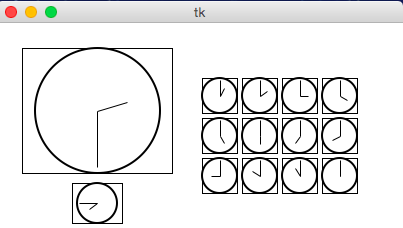
- Example: Clocks!
1. Create empty canvas
from tkinter import *

def draw(canvas, width, height):
    pass # replace with your drawing code!

def runDrawing(width=300, height=300):
    root = Tk()
    canvas = Canvas(root, width=width, height=height)
    canvas.pack()
    draw(canvas, width, height)
    root.mainloop()
    print("bye!")

runDrawing(400, 200)
Result
2. Draw a rectangle
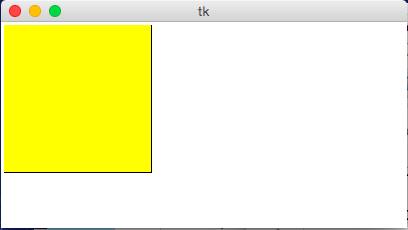
def draw(canvas, width, height):
    canvas.create_rectangle(0,0,150,150, fill="yellow")
Result
3. Draw Multiple Rectangles
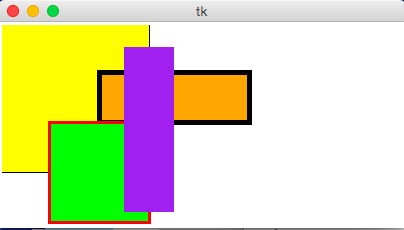
def draw(canvas, width, height):
    canvas.create_rectangle(  0,   0, 150, 150, fill="yellow")
    canvas.create_rectangle(100,  50, 250, 100, fill="orange", width=5)
    canvas.create_rectangle( 50, 100, 150, 200, fill="green",
                                                outline="red", width=3)
    canvas.create_rectangle(125,  25, 175, 190, fill="purple", width=0)
Result
4. Draw Centered Rectangles
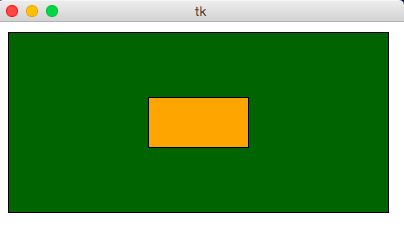
def draw(canvas, width, height):
    margin = 10
    # Approach #1: Add margin to top/left, subtract margin from bottom/right:
    canvas.create_rectangle(margin, margin, width-margin, height-margin,
                            fill="darkGreen")
    # Approach #2: add/subtract width/height from center (cx, cy)
    (cx, cy) = (width/2, height/2)
    (rectWidth, rectHeight) = (width/4, height/4)
    canvas.create_rectangle(cx - rectWidth/2, cy - rectHeight/2,
                            cx + rectWidth/2, cy + rectHeight/2,
                            fill="orange")
Result
5. Draw Custom Colors
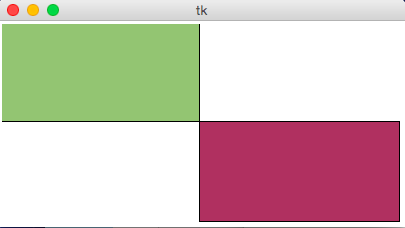
def rgbString(red, green, blue):
    return "#%02x%02x%02x" % (red, green, blue)

def draw(canvas, width, height):
    pistachio = rgbString(147, 197, 114)
    maroon = rgbString(176, 48, 96)
    canvas.create_rectangle(0, 0, width/2, height/2, fill=pistachio)
    canvas.create_rectangle(width/2, height/2, width, height, fill=maroon)
Result
6. Draw Other Shapes and Text
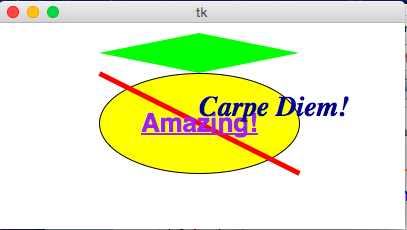
def draw(canvas, width, height):
    canvas.create_oval(100, 50, 300, 150, fill="yellow")
    canvas.create_polygon(100,30,200,50,300,30,200,10, fill="green")
    canvas.create_line(100, 50, 300, 150, fill="red", width=5)
    canvas.create_text(200, 100, text="Amazing!",
                       fill="purple", font="Helvetica 26 bold underline")
    canvas.create_text(200, 100, text="Carpe Diem!", anchor=SW,
                       fill="darkBlue", font="Times 28 bold italic")
Result
7. Graphics Helper Functions
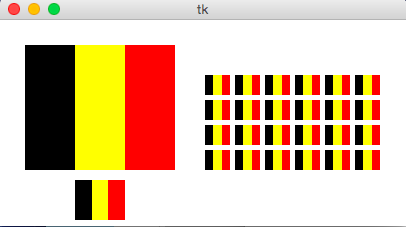
def drawBelgianFlag(canvas, x0, y0, x1, y1):
    # draw a Belgian flag in the area bounded by (x0,y0) in
    # the top-left and (x1,y1) in the bottom-right
    width = (x1 - x0)
    canvas.create_rectangle(x0, y0, x0+width/3, y1, fill="black", width=0)
    canvas.create_rectangle(x0+width/3, y0, x0+width*2/3, y1,
                            fill="yellow", width=0)
    canvas.create_rectangle(x0+width*2/3, y0, x1, y1, fill="red", width=0)

def draw(canvas, width, height):
    # Draw a large Belgian flag
    drawBelgianFlag(canvas, 25, 25, 175, 150)

    # And draw a smaller one below it
    drawBelgianFlag(canvas, 75, 160, 125, 200)

    # Now let's have some fun and draw a whole grid of Belgian flags!
    flagWidth = 30
    flagHeight = 25
    margin = 5
    for row in range(4):
        for col in range(6):
            left = 200 + col * (flagWidth + margin)
            top = 50 + row * (flagHeight + margin)
            right = left + flagWidth
            bottom = top + flagHeight
            drawBelgianFlag(canvas, left, top, right, bottom)
Result
8. Drawing Circular Patterns with Trigonometry
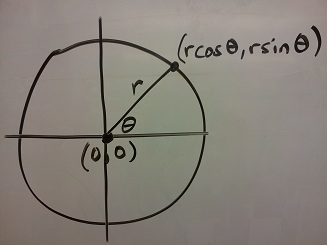
- Circle centered at origin
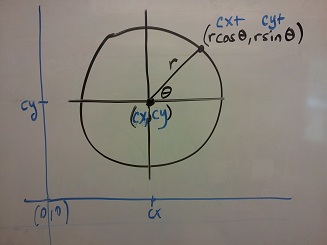
- Circle centered at (cx, cy)
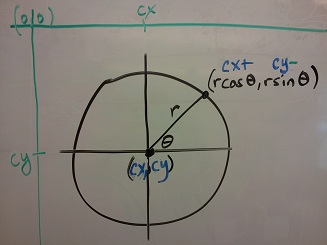
- Circle centered at (cx, cy) in Python graphics ("up is down!")
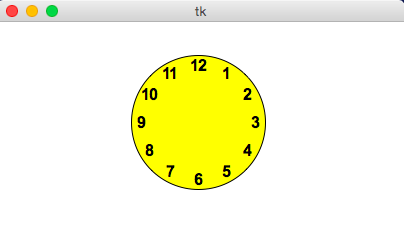
Example
import math

def draw(canvas, width, height):
    (cx, cy, r) = (width/2, height/2, min(width, height)/3)
    canvas.create_oval(cx-r, cy-r, cx+r, cy+r, fill="yellow")
    r *= 0.85 # make smaller so time labels lie inside clock face
    for hour in range(12):
        hourAngle = math.pi/2 - (2*math.pi)*(hour/12)
        hourX = cx + r * math.cos(hourAngle)
        hourY = cy - r * math.sin(hourAngle)
        label = str(hour if (hour > 0) else 12)
        canvas.create_text(hourX, hourY, text=label, font="Arial 16 bold")
Result
9. Example: Clocks!
import math

def drawClock(canvas, x0, y0, x1, y1, hour, minute):
    # draw a clock in the area bounded by (x0,y0) in
    # the top-left and (x1,y1) in the bottom-right
    # with the given time
    # draw an outline rectangle
    canvas.create_rectangle(x0, y0, x1, y1, outline="black", width=1)

    # find relevant values for positioning clock
    width = (x1 - x0)
    height = (y1 - y0)
    r = min(width, height)/2
    cx = (x0 + x1)/2
    cy = (y0 + y1)/2

    # draw the clock face
    canvas.create_oval(cx-r, cy-r, cx+r, cy+r, outline="black", width=2)

    # adjust the hour to take the minutes into account
    hour += minute/60.0

    # find the hourAngle and draw the hour hand
    # but we must adjust because 0 is vertical and
    # it proceeds clockwise, not counter-clockwise!
    hourAngle = math.pi/2 - 2*math.pi*hour/12
    hourRadius = r*1/2
    hourX = cx + hourRadius * math.cos(hourAngle)
    hourY = cy - hourRadius * math.sin(hourAngle)
    canvas.create_line(cx, cy, hourX, hourY, fill="black", width=1)

    # repeat with the minuteAngle for the minuteHand
    minuteAngle = math.pi/2 - 2*math.pi*minute/60
    minuteRadius = r*9/10
    minuteX = cx + minuteRadius * math.cos(minuteAngle)
    minuteY = cy - minuteRadius * math.sin(minuteAngle)
    canvas.create_line(cx, cy, minuteX, minuteY, fill="black", width=1)

def draw(canvas, width, height):
    # Draw a large clock showing 2:30
    drawClock(canvas, 25, 25, 175, 150, 2, 30)

    # And draw a smaller one below it showing 7:45
    drawClock(canvas, 75, 160, 125, 200, 7, 45)

    # Now let's have some fun and draw a whole grid of clocks!
    width = 40
    height = 40
    margin = 5
    hour = 0
    for row in range(3):
        for col in range(4):
            left = 200 + col * width + margin
            top = 50 + row * height + margin
            right = left + width - margin
            bottom = top + height - margin
            hour += 1
            drawClock(canvas, left, top, right, bottom, hour, 0)
Result